<?xml version="1.0" encoding="utf-8"?><feed xmlns="http://www.w3.org/2005/Atom" ><generator uri="https://jekyllrb.com/" version="4.4.1">Jekyll</generator><link href="https://derek.stride.host/posts/rss.xml" rel="self" type="application/atom+xml" /><link href="https://derek.stride.host/" rel="alternate" type="text/html" /><updated>2026-08-12T19:56:17+00:00</updated><id>https://derek.stride.host/posts/rss.xml</id><title type="html">derekstride</title><author><name>derekstride</name></author><entry><title type="html">My Workflow with AI Agents</title><link href="https://derek.stride.host/posts/my-ai-workflow" rel="alternate" type="text/html" title="My Workflow with AI Agents" /><published>2025-12-05T00:00:00+00:00</published><updated>2025-12-05T00:00:00+00:00</updated><id>https://derek.stride.host/posts/my-ai-workflow</id><content type="html" xml:base="https://derek.stride.host/posts/my-ai-workflow"><![CDATA[<h2 id="system-prompt--history">System Prompt – History</h2>

<p>In Februray 2025, I went on parental leave. At the time, Copilot, ChatGPT, Cursor, &amp; custom built AI workflows using
your own <code class="language-plaintext highlighter-rouge">TOKEN</code> were the main ways to use generative AI for work. As a neovim user these tools weren’t compelling
enough. Copilot was a fancy autocomplete, ChatGPT was a more interesting Google Search. Cursor looked nice but wasn’t a
significant productivity upgrade from my current workflow, not enough to justify the switch anyway.</p>

<p>Building my own workflow seemed like a good idea but would be a huge lift. I also knew that there was a lot of eyes on
AI and a lot people working to make it easier to leverage. Building my own thing on the side felt like a waste, I either
had to dedicate a lot of thought &amp; energy to compete with other’s or else wait for something better to come along. I
also thought that Cursor might improve enough to make the switch worth it.</p>

<p>I came back from leave in September 2025. I followed along what was happening with AI while I was off but didn’t put
time into playing with it. The development of new AI tools &amp; advancements has been rapid over the past 2 years but
stepping out of the loop &amp; re-entering 7 months into the future. That’s a <em>stark</em> transition. Agents were the tool I
didn’t know I needed. It fit near perfectly into my workflow.</p>

<h2 id="tools">Tools</h2>

<p>Prior to agents my workspace setup relied on a a minimal set of tools that I could easily remember &amp; port to other
workspaces easily.</p>

<ul>
  <li><code class="language-plaintext highlighter-rouge">tmux</code> – + a custom <code class="language-plaintext highlighter-rouge">mux</code> tool to simplify my common commands</li>
  <li><code class="language-plaintext highlighter-rouge">neovim</code> – + glue code to send commands to other <code class="language-plaintext highlighter-rouge">tmux</code> panes.</li>
</ul>

<p>With agents I’ve augmented it with a few more tools but the total set is still quite small.</p>

<ul>
  <li><code class="language-plaintext highlighter-rouge">claude</code> – + a custom <code class="language-plaintext highlighter-rouge">c</code> tool to control MCP’s on startup with <code class="language-plaintext highlighter-rouge">fzf</code></li>
  <li><code class="language-plaintext highlighter-rouge">git worktree</code> - + a custom <code class="language-plaintext highlighter-rouge">wt</code> tool to navigate with <code class="language-plaintext highlighter-rouge">fzf</code></li>
</ul>

<h2 id="prompt--the-workflow">Prompt – The Workflow</h2>

<p>When I want to start on a new piece of work this is what I do</p>

<pre><code class="language-sh-session">$ mux new feature-name  # creates a new tmux window with the name `feature-name`
$ wt new                # pulls worktree name from tmux window i.e. `feature-name`
$ mux split             # create 3 tmux panes Left Half for `nvim`, Right Bottom for `claude` &amp; another for a shell 
</code></pre>

<p>Next, I open <code class="language-plaintext highlighter-rouge">claude</code> (with <code class="language-plaintext highlighter-rouge">c</code>) &amp; <code class="language-plaintext highlighter-rouge">nvim</code>. I use a custom leader command <code class="language-plaintext highlighter-rouge">&lt;leader&gt;&lt;leader&gt; np</code> – <code class="language-plaintext highlighter-rouge">np</code> for <strong>n</strong>otes
<strong>p</strong>rompts. This opens a new file under <code class="language-plaintext highlighter-rouge">$NOTES/claude/prompts/feature-name.md</code> where <code class="language-plaintext highlighter-rouge">feature-name</code> is the <code class="language-plaintext highlighter-rouge">git
branch</code> or the current directory name if it’s not a <code class="language-plaintext highlighter-rouge">git</code> project.</p>

<p>At this point I’m ready to go, I have a prompt file and I can send the contents directly to claude with
<code class="language-plaintext highlighter-rouge">&lt;leader&gt;&lt;leader&gt; c</code>.</p>

<h2 id="reference">Reference</h2>

<p>These are other commands that I use day to day to when resuming past work.</p>

<div class="language-plaintext highlighter-rouge"><div class="highlight"><pre class="highlight"><code>mux new [NAME]          # omitting NAME will open `fzf` with existing worktrees
wt swtich               # select an existing worktree with `fzf`, this is the default command when run as `wt`
</code></pre></div></div>

<p>Neovim has a few lua functions that help work with claude &amp; tmux</p>

<div class="language-plaintext highlighter-rouge"><div class="highlight"><pre class="highlight"><code>&lt;leader&gt;&lt;leader&gt; c      # send full buffer or highlighted region to claude pane
&lt;leader&gt;&lt;leader&gt; f      # send filepath + line numbers to claude (uses @/file/path syntax) to force claude to read it
&lt;leader&gt;&lt;leader&gt; fn     # find notes – open fuzzy finder scoped to `$NOTES/` with my claude prompts, commands &amp; agents
</code></pre></div></div>]]></content><author><name>derekstride</name></author><summary type="html"><![CDATA[A workspace with simple tools that leverages multiple parallel AI agents.]]></summary></entry><entry><title type="html">A Comprehensive Introduction to Tree-sitter</title><link href="https://derek.stride.host/posts/comprehensive-introduction-to-tree-sitter" rel="alternate" type="text/html" title="A Comprehensive Introduction to Tree-sitter" /><published>2021-08-06T00:00:00+00:00</published><updated>2021-08-06T00:00:00+00:00</updated><id>https://derek.stride.host/posts/comprehensive-introduction-to-tree-sitter</id><content type="html" xml:base="https://derek.stride.host/posts/comprehensive-introduction-to-tree-sitter"><![CDATA[<p>Check out the <a href="https://github.com/tree-sitter/tree-sitter">tree-sitter</a> repo on GitHub and their
<a href="https://tree-sitter.github.io/tree-sitter/">documentation</a> if you’re unfamiliar with the project. TL;DR from the
GitHub repo:</p>

<blockquote>
  <p>Tree-sitter is a parser generator tool and an incremental parsing library. It can build a concrete syntax tree for a
source file and efficiently update the syntax tree as the source file is edited.</p>
</blockquote>

<p>Tree-sitter allows you to write a <a href="https://github.com/Shopify/tree-sitter-liquid/blob/main/grammar.js">grammar.js</a> file
that describes the grammar of a programming language. It generates a complete parser for your language with no
dependencies in a file called <a href="https://github.com/Shopify/tree-sitter-liquid/blob/main/src/parser.c">src/parser.c</a>. It
also generates bindings for various languages like
<a href="https://github.com/tree-sitter/tree-sitter/blob/master/lib/binding_rust/README.md">Rust</a> and
<a href="https://github.com/tree-sitter/tree-sitter/blob/master/lib/binding_web/README.md">WASM</a>.</p>

<p>Use an <a href="https://en.wikipedia.org/wiki/S-expression">S-expression</a> syntax to query the
<a href="https://tree-sitter.github.io/tree-sitter/creating-parsers#command-parse">AST</a> from a tree-sitter parser. The
documentation includes a <a href="https://tree-sitter.github.io/tree-sitter/playground">playground</a> where you can write code,
see the output AST, and query it with an S-expression.</p>

<p><strong>Try these out in the playground</strong></p>

<div class="language-ruby highlighter-rouge"><div class="highlight"><pre class="highlight"><code><span class="c1"># Code</span>
<span class="k">class</span> <span class="nc">A</span>
	<span class="k">def</span> <span class="nf">foo</span>
    <span class="nb">puts</span> <span class="s1">'hi'</span>
  <span class="k">end</span>
<span class="k">end</span>

<span class="no">A</span><span class="p">.</span><span class="nf">new</span>
<span class="no">A</span><span class="p">.</span><span class="nf">foo</span>
</code></pre></div></div>

<div class="language-scheme highlighter-rouge"><div class="highlight"><pre class="highlight"><code><span class="p">(</span><span class="nf">call</span> <span class="nv">method:</span> <span class="p">(</span><span class="nf">identifier</span><span class="p">)</span> <span class="nv">@function</span><span class="o">.</span><span class="nv">name</span><span class="p">)</span>
<span class="p">(</span><span class="nf">constant</span><span class="p">)</span> <span class="nv">@constant</span>
<span class="p">(</span><span class="nf">method</span> <span class="nv">name:</span> <span class="p">(</span><span class="nf">identifier</span><span class="p">)</span> <span class="nv">@function</span><span class="o">.</span><span class="nv">declaration</span><span class="p">)</span>
<span class="p">[</span>
  <span class="s">"def"</span>
  <span class="s">"class"</span>
  <span class="s">"end"</span>
<span class="p">]</span> <span class="nv">@keyword</span>
</code></pre></div></div>

<p>We can use <a href="https://tree-sitter.github.io/tree-sitter/using-parsers#multi-language-documents">multiple parsers</a> on a
single source file because they work on ranges within a file. For example, a file that includes
<a href="https://github.com/tree-sitter/tree-sitter-html">HTML</a>,
<a href="https://github.com/tree-sitter/tree-sitter-javascript">javascript</a>,
<a href="https://github.com/tree-sitter/tree-sitter-css">CSS</a>, and <a href="https://github.com/Shopify/tree-sitter-liquid">Liquid</a>.</p>

<p>Tree-sitter is not an alternative to <a href="https://microsoft.github.io/language-server-protocol/">language servers</a>. They
serve a different purpose and have properties that make them better at some tasks than tree-sitter and properties that
make them worse at others. Generally speaking, tree-sitter works on a per-file basis and language servers work at the
project level. Language servers each have their dependencies and communicate via RPC with the client in the editor.
Tree-sitter has no dependencies and is much faster. It also provides an AST that allows arbitrary analysis.</p>

<h2 id="how-does-a-tree-sitter-parser-work">How does a tree-sitter Parser Work?</h2>

<div class="aspect-w-16 aspect-h-9">
  <iframe src="https://www.youtube-nocookie.com/embed/Jes3bD6P0To" title="YouTube video player" frameborder="0" allow="accelerometer; autoplay; clipboard-write; encrypted-media; gyroscope; picture-in-picture" allowfullscreen=""></iframe>
</div>

<p>This section is taken from the Strange Loop Conference talk <em>Tree-sitter - a new parsing system for programming tools</em>
by Max Brunsfeld.</p>

<p>Tree-sitter is an incremental generalized left-right (GLR) Parser. Let’s look at each term individually to understand
what they mean.</p>

<h3 id="what-is-an-lr-parser">What is an LR Parser?</h3>

<p>An LR parser will read a line of text from left to right without any backtracking. The parser uses a lexer function to
read each character and group them into tokens. Then it uses a parse table to decide how to group those tokens into
trees.</p>

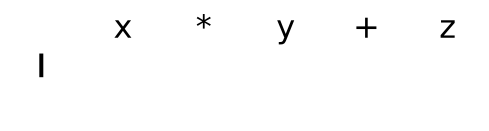
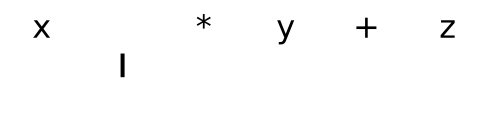
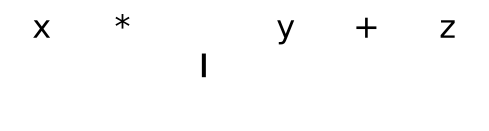
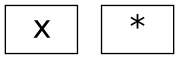
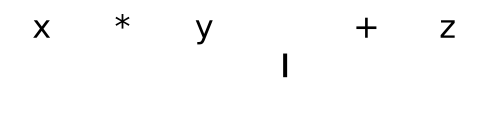
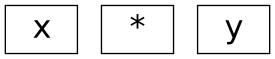
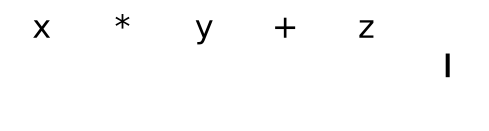
<p>Take the following program as an example, <code class="language-plaintext highlighter-rouge">x * y + z</code>. In grade school, math teachers instruct students about the order
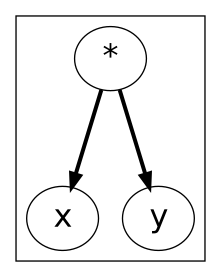
of operations. They learn first to evaluate <code class="language-plaintext highlighter-rouge">x * y</code> and then add <code class="language-plaintext highlighter-rouge">z</code> to the result. A parser will convert the program
into a syntax tree for a computer to understand. The Figure 1 shows the parser at the start of the program. In Figure 2,
3, and 4 the parser pushes each token onto the stack. The vertical bar represents the location of the parser.</p>

<figure class="flex flex-col flex-nowrap content-around">
  <img src="/assets/images/graphs/tree-sitter-parsing-program-0.svg" alt="Figure 1: Initial state of the parser." />
  <figcaption><p><strong><em>Figure 1: Initial state of the parser.</em></strong></p>
</figcaption>
</figure>
<figure class="flex flex-col flex-nowrap content-around">
  <img src="/assets/images/graphs/tree-sitter-parsing-program-1.svg" alt="***Figure 2a: The state of the parser after it pushes the first token `x` onto the stack.***" />
  <div class="flex flex-row flex-nowrap items-center pl-8 sm:pl-16">
    <span class="font-bold text-2xl">Stack:</span>
    <img src="/assets/images/graphs/tree-sitter-parsing-part-0.svg" alt="***Figure 2b: The state of the parser after it pushes the first token `x` onto the stack.***" />
  </div>
  <figcaption><p><strong><em>Figure 2: The state of the parser after it pushes the first token <code class="language-plaintext highlighter-rouge">x</code> onto the stack.</em></strong></p>
</figcaption>
</figure>
<figure class="flex flex-col flex-nowrap content-around">
  <img src="/assets/images/graphs/tree-sitter-parsing-program-2.svg" alt="***Figure 3a: The state of the parser after it pushes the second token `*` onto the stack.***" />
  <div class="flex flex-row flex-nowrap items-center pl-8 sm:pl-16">
    <span class="font-bold text-2xl">Stack:</span>
    <img src="/assets/images/graphs/tree-sitter-parsing-part-1.svg" alt="***Figure 3b: The state of the parser after it pushes the second token `*` onto the stack.***" />
  </div>
  <figcaption><p><strong><em>Figure 3: The state of the parser after it pushes the second token <code class="language-plaintext highlighter-rouge">*</code> onto the stack.</em></strong></p>
</figcaption>
</figure>
<figure class="flex flex-col flex-nowrap content-around">
  <img src="/assets/images/graphs/tree-sitter-parsing-program-3.svg" alt="***Figure 4a: The state of the parser after it pushes the third token `y` onto the stack.***" />
  <div class="flex flex-row flex-nowrap items-center pl-8 sm:pl-16">
    <span class="font-bold text-2xl">Stack:</span>
    <img src="/assets/images/graphs/tree-sitter-parsing-part-2.svg" alt="***Figure 4b: The state of the parser after it pushes the third token `y` onto the stack.***" />
  </div>
  <figcaption><p><strong><em>Figure 4: The state of the parser after it pushes the third token <code class="language-plaintext highlighter-rouge">y</code> onto the stack.</em></strong></p>
</figcaption>
</figure>

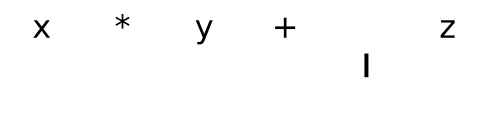
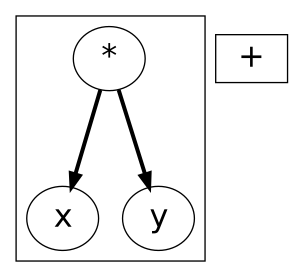
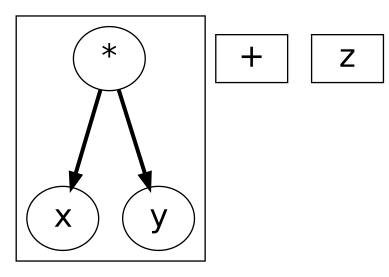
<p>The parse table will indicate that the parser needs to perform a different action when encountering the “+” token. The
reduction action tells the parser to pop tokens off the stack, group them into a tree, and push the tree back onto the
stack. Figure 5 below displays the stack after the reduction. Figure 6 and 7 show the parser pushing the rest of the
tokens onto the stack.</p>
<figure class="flex flex-col flex-nowrap content-around">
  <img src="/assets/images/graphs/tree-sitter-parsing-program-3.svg" alt="***Figure 5a: The state of the parser after the first reduce action. It pops each token off the stack and builds a tree.***" />
  <div class="flex flex-row flex-nowrap items-center pl-8 sm:pl-16">
    <span class="font-bold text-2xl">Stack:</span>
    <img src="/assets/images/graphs/tree-sitter-parsing-part-3.svg" alt="***Figure 5b: The state of the parser after the first reduce action. It pops each token off the stack and builds a tree.***" />
  </div>
  <figcaption><p><strong><em>Figure 5: The state of the parser after the first reduce action. It pops each token off the stack and builds a tree.</em></strong></p>
</figcaption>
</figure>

<figure class="flex flex-col flex-nowrap content-around">
  <img src="/assets/images/graphs/tree-sitter-parsing-program-4.svg" alt="***Figure 6a: The state of the parser after it pushes the fourth token `+` onto the stack.***" />
  <div class="flex flex-row flex-nowrap items-center pl-8 sm:pl-16">
    <span class="font-bold text-2xl">Stack:</span>
    <img src="/assets/images/graphs/tree-sitter-parsing-part-4.svg" alt="***Figure 6b: The state of the parser after it pushes the fourth token `+` onto the stack.***" />
  </div>
  <figcaption><p><strong><em>Figure 6: The state of the parser after it pushes the fourth token <code class="language-plaintext highlighter-rouge">+</code> onto the stack.</em></strong></p>
</figcaption>
</figure>

<figure class="flex flex-col flex-nowrap content-around">
  <img src="/assets/images/graphs/tree-sitter-parsing-program-5.svg" alt="***Figure 7a: The state of the parser after it pushes the fifth and final token `z` onto the stack.***" />
  <div class="flex flex-row flex-nowrap items-center pl-8 sm:pl-16">
    <span class="font-bold text-2xl">Stack:</span>
    <img src="/assets/images/graphs/tree-sitter-parsing-part-5.svg" alt="***Figure 7b: The state of the parser after it pushes the fifth and final token `z` onto the stack.***" />
  </div>
  <figcaption><p><strong><em>Figure 7: The state of the parser after it pushes the fifth and final token <code class="language-plaintext highlighter-rouge">z</code> onto the stack.</em></strong></p>
</figcaption>
</figure>

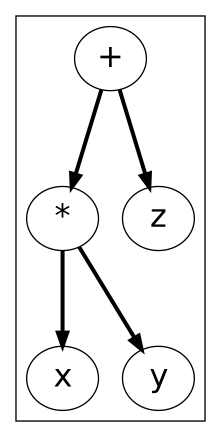
<p>The parse table will indicate that the parser needs to perform a final reduction when it reaches the end of the program.
In Figure 8 the final syntax tree is the last element left on the stack.</p>

<figure class="flex flex-col flex-nowrap content-around">
  <img src="/assets/images/graphs/tree-sitter-parsing-program-5.svg" alt="Figure 8a: The state of the parser after the final reduce action. It pops off the tokens of the preceding tree and constructs a new tree." />
  <div class="flex flex-row flex-nowrap items-center pl-8 sm:pl-16">
    <span class="font-bold text-2xl">Stack:</span>
    <img src="/assets/images/graphs/tree-sitter-parsing-part-6.svg" alt="Figure 8b: The state of the parser after the final reduce action. It pops off the tokens of the preceding tree and constructs a new tree." />
  </div>
  <figcaption><p><strong><em>Figure 8: The state of the parser after the final reduce action. It pops off the tokens of the
  preceding tree and constructs a new tree.</em></strong></p>
</figcaption>
</figure>

<h3 id="what-is-a-generalized-lr-parser">What is a Generalized LR Parser?</h3>

<p>A limitation of LR parsing comes from not being able to backtrack. It makes it hard to parse languages with ambiguity.</p>

<div class="language-javascript highlighter-rouge"><div class="highlight"><pre class="highlight"><code><span class="nx">x</span> <span class="o">=</span> <span class="p">(</span><span class="nx">y</span><span class="p">);</span>       <span class="c1">// parenthesized expression</span>
<span class="nx">x</span> <span class="o">=</span> <span class="p">(</span><span class="nx">y</span><span class="p">)</span> <span class="o">=&gt;</span> <span class="nx">z</span><span class="p">;</span>  <span class="c1">// arrow function</span>
</code></pre></div></div>

<p>GLR parsing is a technique to handle ambiguity in a language. It forks the parse stack into two branches so the parser
can try both interpretations.</p>

<p>Take the example of the arrow function above, <code class="language-plaintext highlighter-rouge">x = (y) =&gt; z</code>. Figure 9 displays the state of the parser right before we
fork the parse stack after reaching the identifier <code class="language-plaintext highlighter-rouge">y</code>. In Figure 10, 11, and 12 the forked parse stack independently
shows tokens pushed onto the stack and the reductions of the trees. Figure 13 shows the parser after chopping off the
invalid branch when it encountered the arrow token.</p>

<figure>
  <img src="/assets/images/graphs/tree-sitter-glr-0.svg" alt="Figure 9: The state of the parser after reaching the identifier `y`." />
  <figcaption><strong><em>Figure 9: The state of the parser after reaching the identifier `y`.</em></strong></figcaption>
</figure>

<figure>
  <img src="/assets/images/graphs/tree-sitter-glr-1.svg" alt="Figure 10: The state of the parser after forking the parse stack." />
  <figcaption><strong><em>Figure 10: The state of the parser after forking the parse stack.</em></strong></figcaption>
</figure>

<figure>
  <img src="/assets/images/graphs/tree-sitter-glr-2.svg" alt="Figure 11: The state of the parser after both forks push the closing parenthesis onto the stack." />
  <figcaption><strong><em>Figure 11: The state of the parser after both forks push the closing parenthesis onto the stack.</em></strong></figcaption>
</figure>

<figure>
  <img src="/assets/images/graphs/tree-sitter-glr-3.svg" alt="Figure 12: The state of the parser after a reduction in the top branch." />
  <figcaption><strong><em>Figure 12: The state of the parser after a reduction in the top branch.</em></strong></figcaption>
</figure>

<figure>
  <img src="/assets/images/graphs/tree-sitter-glr-4.svg" alt="Figure 13: The state of the parser after chopping off the invalid branch when the arrow token was encountered." />
  <figcaption><strong><em>Figure 13: The state of the parser after chopping off the invalid branch when the arrow token was encountered.</em></strong></figcaption>
</figure>

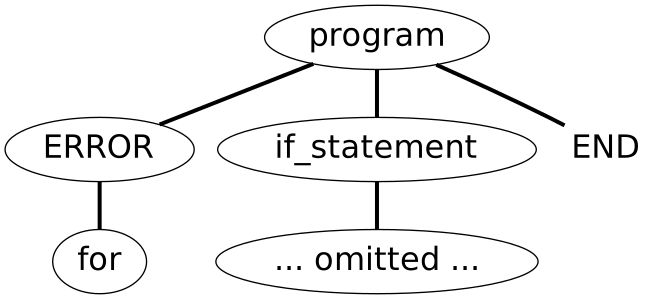
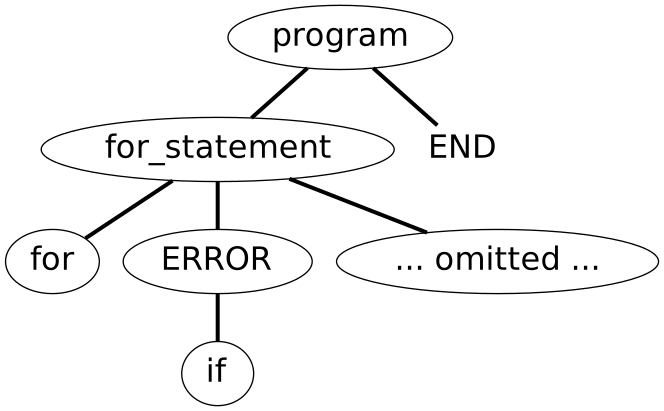
<p>Tree-sitter also uses GLR parsing for error recovery. When typing in an editor, errors are present whenever the current
piece of code isn’t complete. The following code snippets show two similar examples. First, we have a for statement with
an out-of-place keyword <code class="language-plaintext highlighter-rouge">if</code> after the keyword <code class="language-plaintext highlighter-rouge">for</code>. Second, we have an if statement with an out-of-place keyword <code class="language-plaintext highlighter-rouge">for</code>
before it. Using GLR parsing tree-sitter can build valid syntax trees for both examples with error nodes in the correct
place.</p>

<div class="language-c highlighter-rouge"><div class="highlight"><pre class="highlight"><code><span class="k">for</span> <span class="k">if</span> <span class="p">(</span><span class="n">let</span> <span class="n">x</span> <span class="o">=</span> <span class="mi">0</span><span class="p">;</span> <span class="n">x</span> <span class="o">&lt;</span> <span class="mi">5</span><span class="p">;</span> <span class="n">x</span><span class="o">++</span><span class="p">)</span> <span class="n">y</span><span class="p">()</span>
</code></pre></div></div>

<figure>
  <img src="/assets/images/graphs/tree-sitter-glr-error-1.svg" alt="Figure 14: The syntax tree of the for statement showing the location of the invalid `if` keyword." />
  <figcaption><strong><em>Figure 14: The syntax tree of the for statement showing the location of the invalid `if` keyword.</em></strong></figcaption>
</figure>

<div class="language-c highlighter-rouge"><div class="highlight"><pre class="highlight"><code><span class="k">for</span> <span class="k">if</span> <span class="p">(</span><span class="n">x</span><span class="p">)</span> <span class="n">y</span><span class="p">()</span>
</code></pre></div></div>

<figure>
  <img src="/assets/images/graphs/tree-sitter-glr-error-0.svg" alt="Figure 15: The syntax tree of the if statement showing the location of the invalid “for” keyword." />
  <figcaption><strong><em>Figure 15: The syntax tree of the if statement showing the location of the invalid “for” keyword.</em></strong></figcaption>
</figure>

<h3 id="what-is-incremental-parsing">What is Incremental Parsing?</h3>

<blockquote>
  <p>Tree-sitter can be embedded in text editors because it is fast enough to parse an entire file on every keystroke</p>
</blockquote>

<p>An incremental parser will parse the program once. When editing, the parser does not have to parse the entire source
file again. It can use the position of the modified text and walk the current syntax tree. As it walks the tree, it
marks the nodes that contain the location of the modified text. It starts in an empty state and reuses the nodes of the
previous tree that haven’t changed in the new tree.</p>

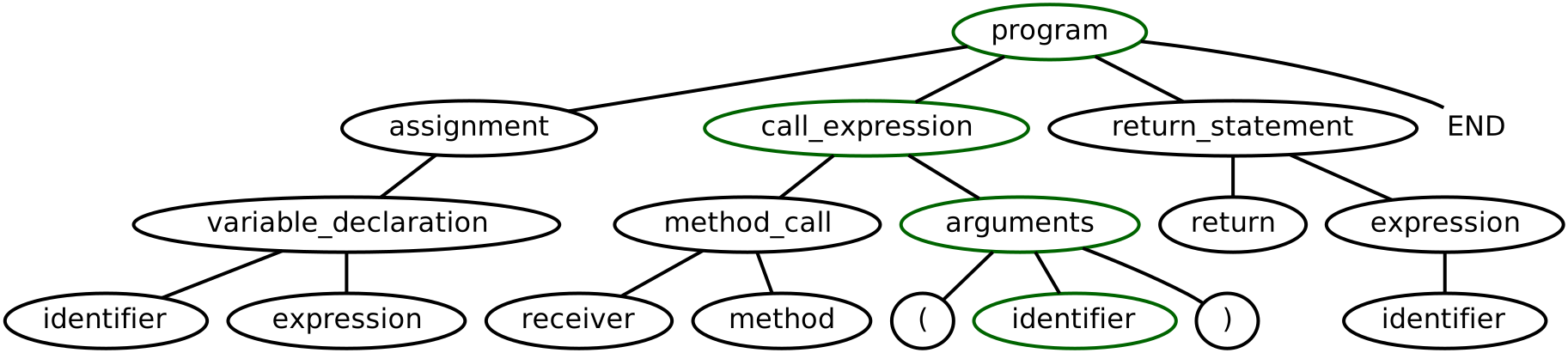
<p>Suppose we change the following code to add a new argument d to the method call c. The nodes highlighted in green are
the nodes marked by the parser. The parser can reuse all the other nodes in the tree</p>

<div class="language-javascript highlighter-rouge"><div class="highlight"><pre class="highlight"><code><span class="kd">var</span> <span class="nx">a</span> <span class="o">=</span> <span class="k">new</span> <span class="nc">B</span><span class="p">();</span>
<span class="nx">a</span><span class="p">.</span><span class="nf">c</span><span class="p">(</span><span class="nx">d</span><span class="p">);</span>
<span class="c1">//  ^</span>
<span class="c1">//  The modification.</span>
<span class="k">return</span> <span class="nx">a</span><span class="p">;</span>
</code></pre></div></div>

<figure>
  <img src="/assets/images/graphs/tree-sitter-incremental-1.svg" alt="Figure 16: The syntax tree of the program after the edit, highlighting nodes that are marked by tree-sitter.
  It is a pseudocode equivalent for a diagram and not an accurate representation of the tree built by tree-sitter." />
  <figcaption><strong><em>Figure 16: The syntax tree of the program after the edit, highlighting nodes that are marked by tree-sitter.
  It is a pseudocode equivalent for a diagram and not an accurate representation of the tree built by tree-sitter.</em></strong></figcaption>
</figure>

<h2 id="how-to-build-a-parser">How to build a parser</h2>

<p>You can find everything you need to build a parser with tree-sitter in the
<a href="https://tree-sitter.github.io/tree-sitter/creating-parsers">documentation</a>. The next section walks through an example
to help get a head start on creating a parser. Find the source code for the full parser on
<a href="https://github.com/DerekStride/tree-sitter-math">GitHub</a>.</p>

<p>Find the test files in the <code class="language-plaintext highlighter-rouge">test/corpus</code> directory. The other file we need to modify is <code class="language-plaintext highlighter-rouge">grammar.js</code>. Below you’ll find
the code to declare that an expression can be either a number or a variable.</p>

<div class="language-javascript highlighter-rouge"><div class="highlight"><pre class="highlight"><code><span class="nx">module</span><span class="p">.</span><span class="nx">exports</span> <span class="o">=</span> <span class="nf">grammar</span><span class="p">({</span>
  <span class="na">name</span><span class="p">:</span> <span class="dl">'</span><span class="s1">math</span><span class="dl">'</span><span class="p">,</span>

  <span class="na">rules</span><span class="p">:</span> <span class="p">{</span>
    <span class="na">expression</span><span class="p">:</span> <span class="nx">$</span> <span class="o">=&gt;</span> <span class="nx">$</span><span class="p">.</span><span class="nx">_expression</span><span class="p">,</span>
    <span class="na">_expression</span><span class="p">:</span> <span class="nx">$</span> <span class="o">=&gt;</span> <span class="nf">choice</span><span class="p">(</span>
      <span class="nx">$</span><span class="p">.</span><span class="nx">variable</span><span class="p">,</span>
      <span class="nx">$</span><span class="p">.</span><span class="nx">number</span><span class="p">,</span>
    <span class="p">),</span>

    <span class="na">number</span><span class="p">:</span> <span class="nx">_</span> <span class="o">=&gt;</span> <span class="sr">/</span><span class="se">\d</span><span class="sr">+</span><span class="se">(\.\d</span><span class="sr">+</span><span class="se">)?</span><span class="sr">/</span><span class="p">,</span>
    <span class="na">variable</span><span class="p">:</span> <span class="nx">_</span> <span class="o">=&gt;</span> <span class="sr">/</span><span class="se">([</span><span class="sr">a-zA-Z$</span><span class="se">][</span><span class="sr">0-9a-zA-Z_</span><span class="se">]</span><span class="sr">*</span><span class="se">)</span><span class="sr">/</span><span class="p">,</span>
  <span class="p">}</span>
<span class="p">});</span>
</code></pre></div></div>

<p>Note: the line expression: <code class="language-plaintext highlighter-rouge">$ =&gt; $._expression</code> will allow us to keep the syntax tree cleaner. A Node whose name begins
with an underscore is anonymous and not part of the final syntax tree.</p>

<p>To support addition, define a new node called <code class="language-plaintext highlighter-rouge">sum</code>.</p>

<div class="language-javascript highlighter-rouge"><div class="highlight"><pre class="highlight"><code><span class="nx">sum</span><span class="p">:</span> <span class="nx">$</span> <span class="o">=&gt;</span> <span class="nx">prec</span><span class="p">.</span><span class="nf">left</span><span class="p">(</span>
  <span class="nf">seq</span><span class="p">(</span>
    <span class="nf">field</span><span class="p">(</span><span class="dl">"</span><span class="s2">left</span><span class="dl">"</span><span class="p">,</span> <span class="nx">$</span><span class="p">.</span><span class="nx">_expression</span><span class="p">),</span>
    <span class="dl">"</span><span class="s2">+</span><span class="dl">"</span><span class="p">,</span>
    <span class="nf">field</span><span class="p">(</span><span class="dl">"</span><span class="s2">right</span><span class="dl">"</span><span class="p">,</span> <span class="nx">$</span><span class="p">.</span><span class="nx">_expression</span><span class="p">),</span>
  <span class="p">),</span>
<span class="p">),</span>
</code></pre></div></div>

<p>The <code class="language-plaintext highlighter-rouge">prec.left</code> function tells tree-sitter how to resolve ambiguities that arise from multiple additions. It’s telling
the parser to evaluate sums left to right. Below is the error message tree-sitter would output without adding the
precedence function. Take the equation <code class="language-plaintext highlighter-rouge">x + y + z</code>, in the possible interpretations below the first means <code class="language-plaintext highlighter-rouge">(x + y) + z</code>
and the second means <code class="language-plaintext highlighter-rouge">x + (y + z)</code>. Since addition is <a href="https://en.wikipedia.org/wiki/Commutative_property">commutative</a>
we could have also chosen <code class="language-plaintext highlighter-rouge">prec.right</code>.</p>

<div class="language-plaintext highlighter-rouge"><div class="highlight"><pre class="highlight"><code>Unresolved conflict for symbol sequence:

  _expression '+' _expression • '+' …

Possible interpretations:

  1: (sum _expression '+' _expression) • '+' …
  2: _expression '+' (sum _expression • '+' _expression)
</code></pre></div></div>

<p>A source of error arises if we try to add support for multiplication. Suppose we add the following node product. In the
equation <code class="language-plaintext highlighter-rouge">z + x * y</code>, we would output the wrong syntax tree.</p>

<div class="language-javascript highlighter-rouge"><div class="highlight"><pre class="highlight"><code><span class="nx">product</span><span class="p">:</span> <span class="nx">$</span> <span class="o">=&gt;</span> <span class="nx">prec</span><span class="p">.</span><span class="nf">left</span><span class="p">(</span>
  <span class="nf">seq</span><span class="p">(</span>
    <span class="nf">field</span><span class="p">(</span><span class="dl">"</span><span class="s2">left</span><span class="dl">"</span><span class="p">,</span> <span class="nx">$</span><span class="p">.</span><span class="nx">_expression</span><span class="p">),</span>
    <span class="dl">"</span><span class="s2">*</span><span class="dl">"</span><span class="p">,</span>
    <span class="nf">field</span><span class="p">(</span><span class="dl">"</span><span class="s2">right</span><span class="dl">"</span><span class="p">,</span> <span class="nx">$</span><span class="p">.</span><span class="nx">_expression</span><span class="p">),</span>
  <span class="p">),</span>
<span class="p">),</span>
</code></pre></div></div>

<p>The following code snippet is a tree-sitter test. The test name lives between a header denoted by equal signs. Following
the header is the source code and the expected tree separated by dashes. Given the code examples above, the tree-sitter
test below would fail. The reason the test fails is that multiplication and addition have the same precedence.</p>

<div class="language-plaintext highlighter-rouge"><div class="highlight"><pre class="highlight"><code>=========================
Multiplication &amp; addition
=========================

z + x * y

-------------------------

(expression
 (sum
  left: (variable)
  right: (product
    left: (variable)
    right: (variable))))
</code></pre></div></div>

<p>By default, every rule in our grammar has a precedence of 0. We could increase the precedence of multiplication to 1.
However, the cleaner solution is to attach a name to our levels of precedence. Define precedences at the start of the
module before we define our rules. Then add those names as the first argument to our precedence functions. Check out
this <a href="https://github.com/DerekStride/tree-sitter-math/commit/5a6f4549aafe325e33b9d9ed967c61d70177f06a">commit</a> for a
cleaner diff.</p>

<div class="language-diff highlighter-rouge"><div class="highlight"><pre class="highlight"><code><span class="gi">+ precedences: _ =&gt; [
+   [
+     "multiplication",
+     "addition",
+   ],
+ ],
</span><span class="err">
</span><span class="p">sum: $ =&gt; prec.left(
</span><span class="gi">+  "addition",
</span><span class="err">
</span><span class="p">product: $ =&gt; prec.left(
</span><span class="gi">+  "multiplication",
</span></code></pre></div></div>

<p>Now rules, ambiguities, and precedence should make more sense. Be sure to check out the <a href="https://github.com/DerekStride/tree-sitter-math">GitHub
repo</a> for a reference implementation of the order of operations for
addition, subtraction, multiplication, division, exponents, and parenthesized expressions.</p>

<h2 id="how-to-interact-with-the-ast">How to interact with the AST</h2>

<p>Use the S-expression query syntax to interact with a syntax tree produced by a tree-sitter parser. The S-expressions can
define capture groups. Use these captures as the base unit of work. A piece of code that works with captures is language
agnostic. For example, tree-sitter can be used for faster and semantically correct syntax highlighting. In neovim, you
can specify captures to change the parser used for highlighting. Tree-sitter can provide syntax highlighting for
languages other than that of the open file.</p>

<p>For example, see this <a href="https://github.com/nvim-treesitter/nvim-treesitter/pull/1190">pull request</a> to nvim-treesitter.
Nvim-treesitter uses the capture groups <code class="language-plaintext highlighter-rouge">@content</code> and <code class="language-plaintext highlighter-rouge">@language</code> to specify injected code and its language for syntax
highlighting. In ruby, if a heredoc contains code it’s common to delimit the heredoc with tags indicating the language
contained in the string. Here is an example:</p>

<div class="language-ruby highlighter-rouge"><div class="highlight"><pre class="highlight"><code><span class="no">MY_HTML</span> <span class="o">=</span> <span class="o">&lt;&lt;~</span><span class="no">HTML</span><span class="sh">
  &lt;title&gt;This is a title&lt;/title&gt;
  &lt;div class="example-class"&gt;
    &lt;span&gt;This is a span&lt;/span&gt;
  &lt;/div&gt;
</span><span class="no">HTML</span>
</code></pre></div></div>

<p>The <a href="https://github.com/nvim-treesitter/nvim-treesitter/pull/1190">pull request</a> mentioned above added a variant of the
simplified query below. It defined the <code class="language-plaintext highlighter-rouge">@content</code> and <code class="language-plaintext highlighter-rouge">@language</code> capture groups for ruby. It was easy to add support
for a new language because the code performing syntax highlighting works on the capture groups.</p>

<p><a href="https://tree-sitter.github.io/tree-sitter/syntax-highlighting">Syntax highlighting</a> is not the only superpower of
tree-sitter. Structural editing of source code is easy with access to a syntax tree. I highly recommend neovim users
checkout <a href="https://github.com/nvim-treesitter/nvim-treesitter">nvim-treesitter</a>. At the time of writing this post, that
project enables novel features and performance improvements on existing vim features. Other plugins exist that allow
even more control of the syntax tree like
<a href="https://github.com/nvim-treesitter/nvim-treesitter-textobjects">nvim-treesitter-textobjects</a> and
<a href="https://github.com/nvim-treesitter/nvim-treesitter-refactor">nvim-treesitter-refactor</a>.</p>

<h2 id="the-future-of-editing-code">The future of editing code</h2>

<p>The tools used to edit source code continue to get more sophisticated. Features that once
only lived in custom-built interactive development environments (IDEs) are making their way into lightweight
alternatives like VSCode and Vim. Language Servers bring the IDE experience to any editor with an LSP client.
Tree-sitter allows language-agnostic tools to be powered by querying its syntax trees. Tree-sitter is a step in the
right direction.</p>

<p>The ability for a developer to translate their thoughts into code, reorganize it, and refactor it relies on great tools
like tree-sitter.</p>]]></content><author><name>derekstride</name></author><summary type="html"><![CDATA[Tree-sitter is a parser generator tool and an incremental parsing library. It can build a concrete syntax tree for a source file and efficiently update the syntax tree as the source file is edited.]]></summary></entry><entry><title type="html">How Shopify Dynamically Routes Storefront Traffic</title><link href="https://derek.stride.host/posts/how-shopify-dynamically-routes-storefront-traffic" rel="alternate" type="text/html" title="How Shopify Dynamically Routes Storefront Traffic" /><published>2021-04-09T00:00:00+00:00</published><updated>2021-04-09T00:00:00+00:00</updated><id>https://derek.stride.host/posts/how-shopify-dynamically-routes-storefront-traffic</id><content type="html" xml:base="https://derek.stride.host/posts/how-shopify-dynamically-routes-storefront-traffic"><![CDATA[<p><em>This post <a href="https://shopify.engineering/dynamically-route-storefront-traffic">originally appeared on the Shopify Engineering
blog</a> on April 9, 2021.</em></p>

<p>In 2019 we set out to <a href="https://shopify.engineering/how-shopify-reduced-storefront-response-times-rewrite" target="_blank" rel="nofollow noopener noreferrer">rewrite the Shopify storefront implementation</a>. Our goal was to make it faster. We talked about the strategies we used to achieve that goal in a previous post about <a href="https://shopify.engineering/simplify-batch-cache-optimized-server-side-storefront-rendering" target="_blank" rel="nofollow noopener noreferrer">optimizing server-side rendering and implementing efficient caching</a>. To build on that post, I’ll go into detail on how the Storefront Renderer team tweaked our load balancers to shift traffic between the legacy storefront and the new storefront.</p>
<p>First, let's take a look at the technologies we used. For our load balancer, we’re running nginx with <a href="https://github.com/openresty/lua-nginx-module" target="_blank" rel="nofollow noopener noreferrer">OpenResty</a>. We previously discussed how scriptable load balancers are our <a href="https://shopify.engineering/surviving-flashes-of-high-write-traffic-using-scriptable-load-balancers-part-i" target="_blank" rel="nofollow noopener noreferrer">secret weapon for surviving spikes of high traffic</a>. We built our storefront verification system with Lua modules and used that system to ensure our new storefront achieved parity with our legacy storefront. The system to permanently shift traffic to the new storefront, once parity was achieved, was also built with Lua. <a href="https://shopify.engineering/implementing-chatops-into-our-incident-management-procedure" target="_blank" rel="nofollow noopener noreferrer">Our chatbot, spy,</a> is our front end for interacting with the load balancers via our control plane.</p>
<p>At the beginning of the project, we predicted the need to constantly update which requests were supported by the new storefront as we continued to migrate features. We decided to build a rule system that allows us to add new routing rules easily.</p>
<p>Starting out, we kept the rules in a Lua file in our nginx repository, and kept the enabled/disabled status in our control plane. This allowed us to quickly disable a rule without having to wait for a deploy if something went wrong. It proved successful, and at this point in the project, enabling and disabling rules was a breeze. However, our workflow for changing the rules was cumbersome, and we wanted this process to be even faster. We decided to store the whole rule as a JSON payload in our control plane. We used spy to create, update, and delete rules in addition to the previous functionality of enabling and disabling the rules. We only needed to deploy nginx to add new functionality.</p>
<h2>The Power of Dynamic Rules</h2>
<p>Fast continuous integration (CI) time and deployments are great ways to increase the velocity of getting changes into production. However, for time-critical use cases like ours removing the CI time and deployment altogether is even better. Moving the rule system into the control plane and using spy to manipulate the rules removed the entire CI and deployment process. We still require a “code review” on enabled spy commands or before enabling a new command, but that’s a trivial amount of time compared to the full deploy process used prior.</p>
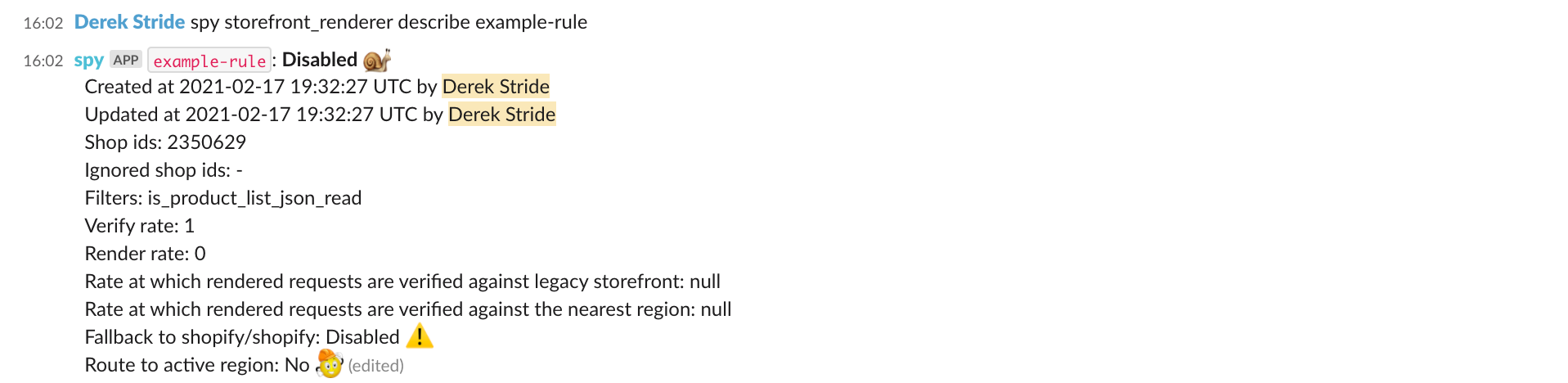
<p>Before diving into the different options available for configuration, let’s look at what it’s like to create a rule with spy. Below are three images showing creating a rule, inspecting it, and then deleting it. The rule was never enabled, as it was an example, but that process requires getting approval from another member of the team. We are affecting a large share of real traffic on the Shopify platform when running the command <code>spy storefront_renderer
enable example-rule</code>, so the rules to good code reviews still apply.</p>
<figure style="text-align: left;"><img alt="An example of how to create a
routing rule with spy via slack." style="display: block; margin-left: auto; margin-right: auto;" data-src="https://cdn.shopify.com/s/files/1/0779/4361/files/How_Shopify_Dynamically_Routes_Storefront_Trafficimage3.png?format=webp&amp;v=1617989454" class=" lazyloaded" src="https://cdn.shopify.com/s/files/1/0779/4361/files/How_Shopify_Dynamically_Routes_Storefront_Trafficimage3.png?format=webp&amp;v=1617989454" />
<figcaption>Adding a rule with spy</figcaption>
</figure>
<figure style="text-align: left;"><img alt="An example of how to describe an
existing rule with spy via slack." style="display: block; margin-left: auto; margin-right: auto;" data-src="https://cdn.shopify.com/s/files/1/0779/4361/files/How_Shopify_Dynamically_Routes_Storefront_Trafficimage2.png?format=webp&amp;v=1617989454" class=" lazyloaded" src="https://cdn.shopify.com/s/files/1/0779/4361/files/How_Shopify_Dynamically_Routes_Storefront_Trafficimage2.png?format=webp&amp;v=1617989454" />
<figcaption>Displaying a rule with spy</figcaption>
</figure>
<figure style="text-align: left;"><img alt="An example of how to describe an
existing rule with spy via slack." style="display: block; margin-left: auto; margin-right: auto;" data-src="https://cdn.shopify.com/s/files/1/0779/4361/files/How_Shopify_Dynamically_Routes_Storefront_Trafficimage4.png?format=webp&amp;v=1617989454" class=" lazyloaded" src="https://cdn.shopify.com/s/files/1/0779/4361/files/How_Shopify_Dynamically_Routes_Storefront_Trafficimage4.png?format=webp&amp;v=1617989454" />
<figcaption>Removing a rule with spy</figcaption>
</figure>
<h2>Configuring New Rules</h2>
<p>Now let’s review the different options available when creating new rules.</p>
<table width="100%">
<tbody>
<tr>
<td style="width: 24.403%;">
<div><meta charset="utf-8" /></div>
<b>Option Name</b>
</td>
<td style="width: 24.597%;"><strong>Description</strong></td>
<td style="width: 15%;"><strong>Default</strong></td>
<td style="width: 26%;">&nbsp;<strong>Example</strong>
</td>
</tr>
<tr>
<td style="width: 24.403%;">
<div><meta charset="utf-8" /></div>
<span>rule_name</span>
</td>
<td style="width: 24.597%;">
<div><meta charset="utf-8" /></div>
<span>The identifier for the rule.</span>
</td>
<td style="width: 15%;"></td>
<td style="width: 26%;">
<div><meta charset="utf-8" /></div>
<span>products-json</span>
</td>
</tr>
<tr>
<td style="width: 24.403%;">
<div><meta charset="utf-8" /></div>
<span>filters</span>
</td>
<td style="width: 24.597%;">
<div><meta charset="utf-8" /></div>
<span>A comma-separated list of filters.</span>
</td>
<td style="width: 15%;"></td>
<td style="width: 26%;">
<div><meta charset="utf-8" /></div>
<span>is_product_list_json_read</span>
</td>
</tr>
<tr>
<td style="width: 24.403%;">shop_ids</td>
<td style="width: 24.597%;">
<div><meta charset="utf-8" /></div>
<span>A comma-separated list of shop ids to which the rule applies.</span>
</td>
<td style="width: 15%;">all</td>
<td style="width: 26%;"></td>
</tr>
</tbody>
</table>
<p>The <code>rule_name </code>is the identifier we use. It can be any string, but it’s usually descriptive of the type of request it matches.</p>
<p>The <code>shop_ids</code> option lets us choose to have a rule target all shops or target a specific shop for testing. For example, test shops allow us to test changes without affecting real production data. This is useful to test rendering live requests with the new storefront because verification requests happen in the background and don’t directly affect client requests.</p>
<p>Next, the <code>filters</code> option determines which requests would match that rule. This allows us to partition the traffic into smaller subsets and target individual controller actions from our legacy Ruby on Rails implementation. A change to the filters list does require us to go through the full deployment process. They are kept in a Lua file, and the filters option is a comma-separated list of function names to apply to the request in a functional style. If all filters return true, then the rule will match that request.<br />
<script src="https://gist.github.com/DerekStride/464b64f7421371ea6fbcec5bc21caea6.js"></script>

<p></p>
<p>Above is an example of a filter, <code>is_product_list_path</code>, that lets us target HTTP GET requests to the storefront products JSON API implemented in Lua.</p>
<table width="572" height="261">
<tbody>
<tr>
<td style="text-align: left; width: 126px;">
<div style="text-align: center;"><b>Option Name</b></div>
</td>
<td style="text-align: left; width: 268px;">
<div><b>Description</b></div>
</td>
<td style="text-align: left; width: 52px;">
<div><b>Default</b></div>
</td>
<td style="text-align: left; width: 62px;">
<div><b>Example</b></div>
</td>
</tr>
<tr style="text-align: center;">
<td style="text-align: left; width: 126px;">
<div><span style="font-weight: 400;">render_rate</span></div>
</td>
<td style="text-align: left; width: 268px;">
<div><span style="font-weight: 400;">The rate at which we render allowed requests.</span></div>
</td>
<td style="text-align: left; width: 52px;">
<div><span style="font-weight: 400;">0</span></div>
</td>
<td style="text-align: left; width: 62px;">
<div><span style="font-weight: 400;">1</span></div>
</td>
</tr>
<tr style="text-align: center;">
<td style="text-align: left; width: 126px;">
<div><span style="font-weight: 400;">verify_rate</span></div>
</td>
<td style="text-align: left; width: 268px;">
<div><span style="font-weight: 400;">The rate at which we verify requests.</span></div>
</td>
<td style="text-align: left; width: 52px;">
<div><span style="font-weight: 400;">0</span></div>
</td>
<td style="text-align: left; width: 62px;">
<div><span style="font-weight: 400;">0</span></div>
</td>
</tr>
<tr style="text-align: center;">
<td style="text-align: left; width: 126px;">
<div><span style="font-weight: 400;">reverse_verify_rate</span></div>
</td>
<td style="text-align: left; width: 268px;">
<div><span style="font-weight: 400;">The rate at which requests are reverse-verified when rendering from the new storefront.</span></div>
</td>
<td style="text-align: left; width: 52px;">
<div><span style="font-weight: 400;">0</span></div>
</td>
<td style="text-align: left; width: 62px;">
<div><span style="font-weight: 400;">0.001</span></div>
</td>
</tr>
</tbody>
</table>

<p><code>Both render_rate</code> and <code>verify_rate</code> allow us to target a percentage of traffic that matches a rule. This is useful for doing gradual rollouts of rendering a new endpoint or verifying a small sample of production traffic.</p>
<p>The&nbsp;<code>reverse_verify_rate</code> is the rate used when a request is already being rendered with the new storefront. It lets us first render the request with the new storefront and then sends the request to the legacy implementation asynchronously for verification. We call this scenario a reverse-verification, as it’s the opposite or reverse of the original flow where the request was rendered by the legacy storefront then sent to the new storefront for verification. We call the opposite flow forward-verification. We use forward-verification to find issues as we implement new endpoints and reverse-verifications to help detect and track down regressions.</p>
<div>
<table width="562" height="159">
<tbody>
<tr>
<td style="width: 100px; text-align: left;">
<p style="text-align: center;"><b>Option Name</b></p>
</td>
<td style="width: 294px; text-align: left;">
<p><b>Description</b></p>
</td>
<td style="width: 52px; text-align: left;">
<p><b>Default</b></p>
</td>
<td style="width: 62px; text-align: left;">
<p><b>Example</b></p>
</td>
</tr>
<tr style="text-align: center;">
<td style="width: 100px; text-align: left;">
<p><span style="font-weight: 400;">self_verify_rate</span></p>
</td>
<td style="width: 294px; text-align: left;">
<p><span style="font-weight: 400;">The rate at which we verify requests in the nearest region.</span></p>
</td>
<td style="width: 52px; text-align: left;">
<p><span style="font-weight: 400;">0</span></p>
</td>
<td style="width: 62px; text-align: left;">
<p><span style="font-weight: 400;">0.001</span></p>
</td>
</tr>
</tbody>
</table>
</div>
<p>&nbsp;</p>
<p>Now is a good time to introduce self-verification and the associated <code>self_verify_rate</code>. One limitation of the legacy storefront implementation was due to how our <a href="https://shopify.engineering/a-pods-architecture-to-allow-shopify-to-scale" target="_blank" rel="nofollow noopener noreferrer">architecture for a Shopify pod</a> meant that only one region had access to the MySQL writer at any given time. This meant that all requests had to go to the active region of a pod. With the new storefront, we decoupled the storefront rendering service from the database writer and now serve storefront requests from any region where a MySQL replica is present.</p>
<p>However, as we started decoupling dependencies on the active region, we found ourselves wanting to verify requests not only against the legacy storefront but also against the active and passive regions with the new storefront. This led us to add the <code>self_verify_rate</code> that allows us to sample requests bound for the active region to be verified against the storefront deployment in the local region.</p>
<p>We have found the routing rules flexible, and it made it easy to add new features or prototypes that are usually quite difficult to roll out. You might be familiar with how we <a href="https://shopify.engineering/performance-testing-shopify" target="_blank" rel="nofollow noopener noreferrer">generate load for testing the system's limits</a>. However, these load tests will often fall victim to our load shedder if the system gets overwhelmed. In this case, we drop any request coming from our load generator to avoid negatively affecting a real client experience. Before BFCM 2020 we wondered how the application behaved if the connections to our dependencies, primarily Redis, went down. We wanted to be as resilient as possible to those types of failures. This isn’t quite the same as testing with a load generation tool because these tests could affect real traffic. The team decided to stand up a whole new storefront deployment, and instead of routing any traffic to it, we used the verifier mechanism to send duplicate requests to it. We then disconnected the new deployment from Redis and turned our load generator on max. Now we had data about how the application performed under partial outages and were able to dig into and improve resiliency of the system before BFCM. These are just some of the ways we leveraged our flexible routing system to quickly and transparently change the underlying storefront implementation.</p>
<h2>Implementation</h2>
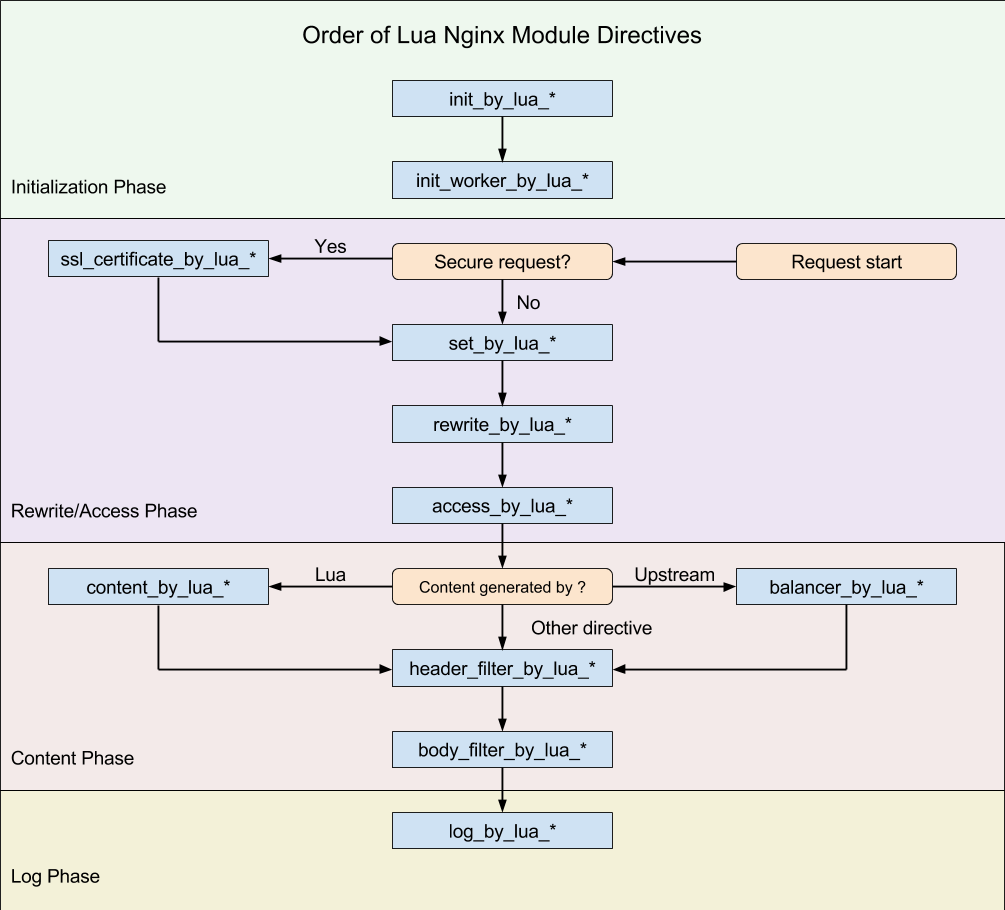
<p>I’d like to walk you through the main entry point for the storefront Lua module to show more of the technical implementation. First, here is a diagram showing where each nginx directive is executed during the request processing.</p>
<figure style="text-align: left;"><img alt="A flow chart showing the order
different Lua callbacks are run in the nginx request lifecycle." data-src="https://cdn.shopify.com/s/files/1/0779/4361/files/How_Shopify_Dynamically_Routes_Storefront_Trafficimage1.png?format=webp&amp;v=1617989454" class=" lazyloaded" src="https://cdn.shopify.com/s/files/1/0779/4361/files/How_Shopify_Dynamically_Routes_Storefront_Trafficimage1.png?format=webp&amp;v=1617989454" />
<figcaption>Order in which nginx directives are run - source: <a href="https://github.com/openresty/lua-nginx-module/blob/master/README.markdown#directives" target="_blank" rel="nofollow noopener noreferrer">github.com/openresty/lua-nginx-module</a></figcaption>
</figure>
<p>During the rewrite phase, before the request is proxied upstream to the rendering service, we check the routing rules to determine which storefront implementation the request should be routed to. After the check during the header filter phase, we check if the request should be forward-verified (if the request went to the legacy storefront) or reverse-verified (if it went to the new storefront). Finally, if we’re verifying the request (regardless of forward or reverse) in the log phase, we queue a copy of the original request to be made to the opposite upstream after the request cycle has completed.</p>
<script src="https://gist.github.com/ShopifyEng/70c9ecb47a56762ba29196f9c1a23bee.js"></script>

<p>In the above code snippet, the renderer module referenced in the rewrite phase and the header filter phase and the verifier module reference in the header filter phase and log phase, use the same function <code>find_matching_rule</code> from the storefront rules module below to get the matching rule from the control plane. The <code>routing_method</code> parameter is passed in to determine whether we’re looking for a rule to match for rendering or for verifying the current request.</p>
<script src="https://gist.github.com/ShopifyEng/03edfb12d3c6c5ae07290b2197944d33.js"></script>

<p>Lastly, the verifier module uses nginx timers to send the verification request out of band of the original request so we don’t leave the client waiting for both upstreams. The <code>send_verification_request_in_background</code> function shown below is responsible for queuing the verification request to be sent. To duplicate the request and verify it, we need to keep track of the original request arguments and the response state from either the legacy storefront (in the case of a forward verification request) or the new storefront (in the case of a reverse verification request). This will then pass them as arguments to the timer since we won’t have access to this information in the context of the timer.</p>
<script src="https://gist.github.com/ShopifyEng/32e22dd2c13d68c7ba6f96ba1e5a7ca6.js"></script>

<h2>The Future of Routing Rules</h2>
<p>At this point, we're starting to simplify this system because the new storefront implementation is serving almost all storefront traffic. We’ll no longer need to verify or render traffic with the legacy storefront implementation once the migration is complete, so we'll be undoing the work we’ve done and going back to the hardcoded rules approach of the early days of the project. Although that doesn’t mean the routing rules are going away completely, the flexibility provided by the routing rules allowed us to build the verification system and stand up a separate deployment for load testing. These features weren’t possible before with the legacy storefront implementation. While we won’t be changing the routing between storefront implementations, the rule system will evolve to support new features.</p>
</p>]]></content><author><name>derekstride</name></author><summary type="html"><![CDATA[Fast continuous integration (CI) time and deployments are great ways to increase the velocity of getting changes into production. However, for time-critical use cases like ours removing the CI time and deployment altogether is even better.]]></summary></entry></feed>